
A legal office help desk with guaranteed response times gives your firm a defined commitment for when a qualified person will respond to a client inquiry or staff technology issue. It does not promise that every matter will be solved instantly. It promises that requests will be seen, assessed, and moved forward within a documented time window.
For a law firm, that distinction matters. A delayed response can mean an anxious client, a missed intake opportunity, a document-access problem before closing, or an unaddressed security concern. A clear service-level agreement, or SLA, turns “we will get back to you soon” into an operating standard that can be measured.
Table Of Contents
- What A Guaranteed Response Time Means
- How To Build A Legal Help Desk SLA
- How To Run, Measure, And Improve The Service
- Key Takeaways
- Frequently Asked Questions
- Sources
What A Guaranteed Response Time Means For Legal Offices
A guaranteed response time is a contractual or documented operating commitment stating how quickly your legal office help desk will provide a first human response after receiving a request. The SLA should define the request types covered, the start and stop points for the clock, business hours, escalation steps, and exclusions.
A best-effort target is different. “Support generally responds quickly” is an aspiration. “A critical document-management outage receives a human response within 15 minutes during covered hours” is a measurable commitment. The second statement can be audited through ticket timestamps, call records, and escalation logs.
First Response Is Not Resolution
The first response is the first meaningful contact from a person who can take ownership of the request. It should show that the issue was received, classified, and assigned or actively investigated. A generic auto-reply such as “Your message has been received” may be useful, but it should not count as a human response unless your SLA explicitly says it does.
Resolution time measures something else: how long it takes to fully restore service, answer the question, or complete the requested work. A password reset may be resolved in minutes. Recovering access to a damaged matter workspace may require identity checks, vendor coordination, file restoration, and validation with the affected user.
A response guarantee protects communication and accountability. A resolution target protects operational recovery. Your SLA needs both.
Consider a real estate law office where a clerk cannot access a shared closing package two hours before a scheduled signing. A 15-minute first-response commitment ensures the help desk begins triage promptly. It does not honestly guarantee a full resolution in 15 minutes, especially if the cause is a Microsoft 365 outage or a third-party legal application problem. The responder should communicate the current status, the next action, and the next update time.
Why Legal Work Needs A Different Model
Legal offices manage work with different urgency signals than a generic business support queue. The impact of an issue depends on more than the number of users affected. It may depend on a court date, transaction closing, statutory filing period, client communication requirement, confidentiality concern, or inability to access a matter record.
For example, a printer problem affecting one office user may be routine. A one-user issue involving inability to send a time-sensitive filing or access an encrypted client document may be urgent. A sound legal-office SLA uses business impact and deadline risk, not only technical symptoms, to decide priority.
Response expectations vary by service channel. Research summarized by EmailAnalytics’ legal services email benchmarks places active client emails around 4 to 8 business hours, with same-business-day replies for deadline-driven matters. Those ranges can help you set a starting point, but a firm should not apply them blindly to every inbox.
A prospective client who submits a web form, an existing client awaiting a nonurgent update, and a staff member reporting a ransomware warning should not enter the same queue with the same clock.
Client-Facing And Internal Support Are Separate Commitments
Your firm should separate client-facing service levels from internal IT support service levels. They can share ticketing tools and reporting, but they serve different purposes.
| Support Area | Primary Risk | What The First Response Should Accomplish | Typical Measurement Focus |
|---|---|---|---|
| New client intake | Lost inquiry, poor first impression, conflicts risk | Confirm receipt, identify matter type, start conflict-aware intake | Speed to first human contact |
| Existing client communication | Missed expectations, deadline confusion | Confirm ownership, clarify urgency, provide next update | Response and follow-up quality |
| Internal legal IT support | Downtime, lost billable work, security exposure | Restore safe access or begin technical triage | Response, restoration, recurring issue trends |
| Security or access incident | Confidentiality, account compromise, compliance risk | Contain risk, verify identity, escalate to incident handling | Immediate action and documented updates |
An intake team may need a rapid callback process. An IT help desk needs severity rules, remote support procedures, vendor escalation, and records of technical actions. Combining both into one vague promise often creates a silent queue: everyone assumes someone else owns the message.
How To Build A Legal Help Desk SLA That Works
A useful SLA is short enough to follow under pressure and specific enough to settle disagreements. It should tell staff and clients what happens when a request arrives, even on a busy day.
Set Tiers Around Legal Impact
Avoid generic labels such as “high,” “medium,” and “low” without definitions. Instead, connect each severity tier to legal work and operational consequences. The table below provides a practical framework. Your final targets should match staffing, coverage, and the systems your firm supports.
| Severity | Legal Office Example | Suggested First Human Response Target | Communication Expectation |
|---|---|---|---|
| Critical | Email outage, suspected account compromise, inaccessible closing or filing system, firm-wide document access failure | 5 to 15 minutes during covered hours | Immediate ownership, frequent updates, escalation path stated |
| High | Multiple users blocked, deadline-related access issue, legal application failure affecting active work | 15 to 30 minutes | Confirm priority, identify workaround, provide next update time |
| Standard | Single-user application issue, routine access request, nonurgent device problem | 30 to 60 minutes | Confirm ticket owner and expected next step |
| Planned Or Low Impact | New equipment request, routine software question, nonurgent improvement request | Same business day or next business day | Confirm scope, approval needs, and planned schedule |
For legal IT support, ELMIDA Solutions’ law firm IT response-time guidance identifies 5 to 15 minute windows for critical issues and 15 to 30 minutes for standard issues. These ranges are useful decision points, not proof that every provider has the same staffing model.
A small office should not promise 24/7 human coverage if it only has business-hours staffing. It can still create a dependable after-hours process by stating that voicemail and portal requests are reviewed at the next business opening, while genuine security or operations emergencies go to a separately defined emergency channel.
Define The Clock Before You Promise A Time
Most SLA disputes happen because the parties measure time differently. Your agreement should state exactly when the response clock starts and when it pauses.
Include these operating rules:
• Receipt point: Specify whether the clock begins when a caller reaches the help desk, an email reaches the support mailbox, a web form enters the ticketing system, or a voicemail is transcribed.
• Covered hours: State the days, time zone, business hours, holidays, and office closures that count toward the SLA.
• Human response standard: Define whether an automated acknowledgment counts. For legal work, it is usually safer to measure the first meaningful human contact separately.
• Waiting states: Explain whether the clock pauses while the help desk awaits client verification, staff testing, approval, or a third-party vendor.
• Escalation trigger: State what happens if the response time is at risk or missed, including who receives the alert and who owns the next communication.
• Exclusions: Identify planned maintenance, force majeure events, unsupported personal devices, or third-party service outages. Exclusions should not become a way to avoid communication.
Business-hours measurement needs special care. If a standard request arrives at 4:55 p.m. and your support desk closes at 5:00 p.m., a one-hour business-hours response target would normally carry forward into the next business day. If your firm wants calendar-time coverage, it must staff for calendar-time coverage.
Match Channels To The Type Of Request
Different channels support different levels of urgency. Phone calls are best for time-sensitive access failures. Secure ticket portals create stronger audit trails. Email works for routine requests but can be unreliable for emergencies if the sender uses vague subject lines or sends messages to an unmonitored inbox.
| Channel | Best Use | Recommended SLA Treatment | Common Failure Mode |
|---|---|---|---|
| Phone | Urgent client or staff interruption | Answer target or rapid callback target | Calls routed to an unattended extension |
| Routine requests and documented communication | First human reply within defined business hours | Auto-reply is mistaken for active handling | |
| Secure Web Form Or Portal | Intake and internal tickets | Ticket creation plus named ownership | Form submissions fail or route to spam |
| SMS Or Emergency Number | Verified urgent events only | Limited, clearly defined use and escalation | Sensitive information sent without safeguards |
| After-Hours Voicemail | Noncritical off-hours messages | Next-business-opening review commitment | No owner checks the queue at opening |
A documented legal-services SLA from Havering Council used a one-working-day return-call standard. That shows why channel-specific promises must be clear: a callback standard can be appropriate for routine calls, while it would be too slow for a security event or a closing-day system outage.
Choose Coverage You Can Actually Deliver
Coverage decisions are business decisions, not just technology decisions. A firm with evening client consultations may need extended intake coverage. A real estate practice with deadline-sensitive transaction work may need an emergency process during peak periods. A firm with predictable daytime operations may be better served by strong business-hours support, a monitored emergency channel, and clear client communication outside those hours.
Some law-firm IT providers offer 24/7 coverage and emergency response windows around 15 minutes, as described by Big Mode Consulting’s law firm support service. Before selecting that model, ask whether the commitment applies to a live human response, remote technical work, on-site dispatch, or final resolution. Those are not interchangeable.
If your firm already has internal IT staff, co-managed IT for law firms can be a practical model when you need overflow coverage, specialized security support, or a dependable escalation path without replacing internal ownership.
How To Run, Measure, And Improve The Service
A guarantee only works if your firm can prove what happened. That requires more than a shared support inbox. You need one system of record for requests, timestamps, ownership, priorities, and communications.
Build A Traceable Intake And Triage Workflow
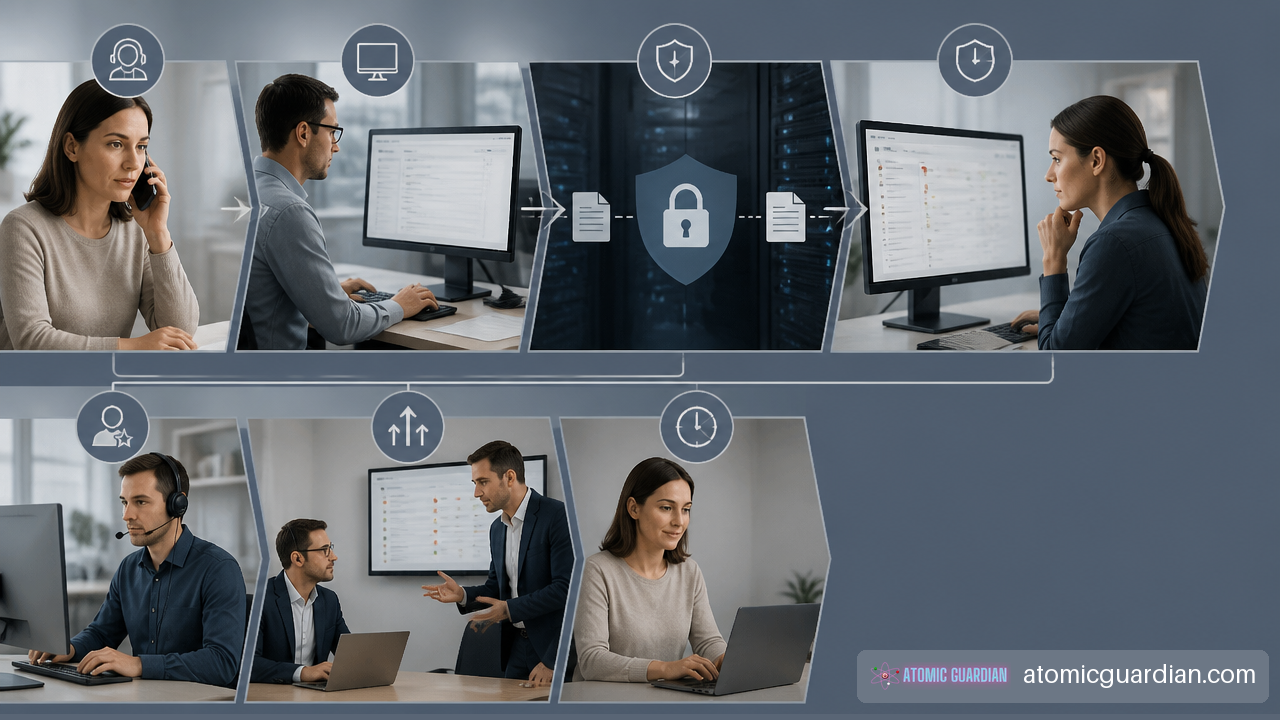
The operating sequence should be consistent across channels:
- Capture the request. Calls, emails, forms, and voicemail should create or connect to a trackable record.
- Verify identity and sensitivity. Do not request confidential facts through an insecure channel simply to classify urgency. Confirm identity first where access or client data is involved.
- Classify business impact. Ask who is affected, what legal work is blocked, whether there is a deadline, and whether confidentiality or security may be involved.
- Assign an owner. The ticket should have a named person or team, not merely a status of “open.”
- Send a meaningful response. Confirm what is understood, what action is underway, and when the requester should expect the next update.
- Escalate before failure. If the issue cannot be handled within the assigned tier, move it to the correct technical, legal, or management owner before the SLA is missed.
- Close with verification. Confirm that access, communication, or the underlying issue is actually resolved. Closure without user verification can hide recurring problems.
The weak point is often handoff. An intake coordinator may receive a website inquiry, send an acknowledgment, and assume a lawyer will follow up. A help desk may receive a legal application ticket and assume the software vendor owns it. Clear assignment rules prevent requests from aging without action.
Measure More Than The Average
Average response time can look acceptable while a small number of urgent matters wait far too long. Review medians, percentile performance, breached tickets, and queue age by severity and channel.
CallShift reports a legal-firm dataset with a 13-minute median response time, 25% of firms responding in under 5 minutes, and 56% responding within an hour. The reported legal-firm response-time figures illustrate why a firm should compare its results by time bands, not just claim that it responds “quickly.”
A useful monthly report should include:
• Number of requests received by channel and severity
• Percentage of first responses within SLA
• Median and 90th-percentile first-response times
• Tickets that exceeded their target and the reason
• Time spent waiting for the requester, a vendor, or internal approval
• Repeat issues involving the same software, device type, or workflow
• After-hours requests and whether the stated process worked
Treat Communication As Part Of The Service
A fast but vague reply can create more work. “We are looking into it” does not tell a lawyer whether a filing can proceed, whether an alternate workstation is available, or whether a client should be contacted.
For critical tickets, the first response should include four elements:
• Confirmation of the reported impact
• The priority assigned and why
• The immediate containment or troubleshooting step
• A specific next-update time, even if the final resolution is unknown
For example: “Your inability to access the closing folder has been classified as high priority because signing is scheduled today. Support is checking account access and shared-drive permissions now. If access is not restored in 15 minutes, the issue will be escalated to the document platform team. The next update will be provided by 10:30 a.m.”
That message makes the process visible. It also gives the requester a path to correct the priority if the situation is more urgent than initially described.
Firms evaluating a provider should examine whether a responsive IT help desk for law firms provides named ownership, documented escalation, and reporting rather than a broad claim of availability.
Review Misses Without Hiding Them
An SLA breach should trigger review, not blame. Determine whether the root cause was staffing, incorrect classification, an unmonitored channel, a failed ticket integration, unclear contact information, or a vendor dependency.
A missed response guarantee also requires client communication. The service owner should acknowledge the miss, state the current status, explain corrective action where appropriate, and record the breach in reporting. Repeated breaches in the same category may show that the target is unrealistic or that the process needs more capacity.
If your internal IT team is capable but overloaded during complex incidents or staff absences, review when to choose co-managed IT support before committing to response windows that your current coverage model cannot sustain.
Key Takeaways
• A guaranteed response time is a measurable promise of first human contact, not a promise of instant resolution.
• Legal-office SLAs should prioritize deadline impact, confidentiality, client communication, and affected users rather than technical labels alone.
• Automated acknowledgments are useful, but they should be measured separately from a meaningful human response.
• Client intake, client service, internal IT support, and security incidents need separate queues or clearly separate service levels.
• A sound SLA defines business hours, holidays, channels, pause conditions, exclusions, escalation paths, and reporting rules.
• Response-time reports should show more than averages. Median results, high-percentile delays, SLA breaches, and repeat issues reveal whether the service is dependable.
Frequently Asked Questions
What Does Guaranteed Response Time Mean For A Legal Office Help Desk?
It means your help desk commits to provide an initial, meaningful human response within a stated time period after receiving a covered request. The SLA should specify the severity level, covered hours, channel, and escalation rules. It does not mean every request will be fully resolved inside that same period.
Does An Automated Email Acknowledgment Count As A Real Response?
Usually, no. An auto-reply proves receipt, but it does not show that someone assessed urgency, confirmed ownership, or started work. Your SLA can count automated acknowledgments as a separate metric, while measuring first human response as the actual service commitment.
What Is A Good First-Response Time For Law Firm Intake?
This depends on your practice area, lead volume, and staffing. For new inquiries, a response within an hour is often a stronger operational goal than a same-day reply, especially for competitive practice areas. If immediate follow-up is not realistic, promise a business-hours timeframe you can consistently meet and route urgent inquiries to a live option.
How Quickly Should A Legal Office Respond To Urgent Client Matters?
Urgent matters tied to a filing, closing, imminent hearing, loss of document access, or potential security incident should receive immediate triage through a designated urgent channel. The response should confirm ownership quickly, explain the next action, and give a next-update time. The exact guarantee depends on whether your firm provides business-hours, extended-hours, or 24/7 coverage.
Should Phone, Email, And Web Form Inquiries Have Different Guarantees?
Yes. Phone calls may need an answer or rapid callback commitment. Web forms should create a ticket and trigger prompt human review. Routine emails may use a longer business-hours target. The key is making the process clear so someone with an urgent issue does not rely on a channel designed for nonurgent communication.
How Do You Measure Response Time During Business Hours?
Start the clock when the request reaches the approved support channel. Count only the staffed hours defined in your SLA, excluding published holidays and closures unless your agreement says otherwise. Stop the clock when a qualified person sends or provides a meaningful first response. Keep timestamps in a ticketing system so results can be audited.
What Should A Legal Help Desk SLA Include?
At minimum, include covered channels, support hours, severity definitions, first-response targets, resolution or restoration targets, escalation steps, communication expectations, pause conditions, exclusions, reporting, and a process for reviewing missed commitments. A useful SLA also identifies the firm contacts authorized to declare an emergency or approve higher-cost work.
Sources
• EmailAnalytics — Customer Service Email Response Time Standards by Industry (+ Policy Targets): https://emailanalytics.com/customer-service-email-response-time-standards/?amp
• Big Mode Consulting — IT Support for Law Firms · 24/7 Technical Help Desk: https://www.bigmodeconsulting.com/services/support
• Havering Council — LEGAL SERVICES SLA 2017-18: https://democracy.havering.gov.uk/documents/s21186/legal%20services%20report%20appendix%202.pdf
• CallShift — Law Firm Response Time Statistics 2026: https://callshift.pro/research/law-firm-response-time-statistics
• ELMIDA Solutions — Law Firm IT Response Times: Expectations: https://www.elmidasolutions.com/blog/guide-law-firm-it-response-times