

Outsourced IT support for law firm employees in Ontario should do more than fix a lawyer’s laptop or reset a password. It should give employees reliable help while protecting client information, controlling access to matter files, supporting legal software, and keeping the firm prepared for disruption.
For decision makers, the central question is not simply whether to outsource. It is whether an IT provider can support the way your employees actually work: at the office, from home, in court, during a closing, or while responding to a client deadline. A strong service model combines responsive helpdesk support with clear security controls, tested recovery procedures, and accountable escalation.
Table Of Contents
• How Employee Facing IT Support Should Work
• Protecting Confidentiality Privacy And Privilege
• Choosing A Service Model And Setting Accountability
• Ontario Implementation Checklist
Key Takeaways
• Employee support must fit legal work. Your IT provider should understand urgent document access, email problems, remote hearings, mobile device issues, Microsoft 365, document systems, and practice management applications.
• Confidentiality, privacy, and privilege are related but different. A vendor must control its access to client data, limit what support staff can see, and record administrative activity without creating unnecessary exposure.
• A service level agreement, or SLA, turns promises into operating rules. It should define response targets, escalation paths, coverage hours, responsibilities, and what happens during a high impact incident.
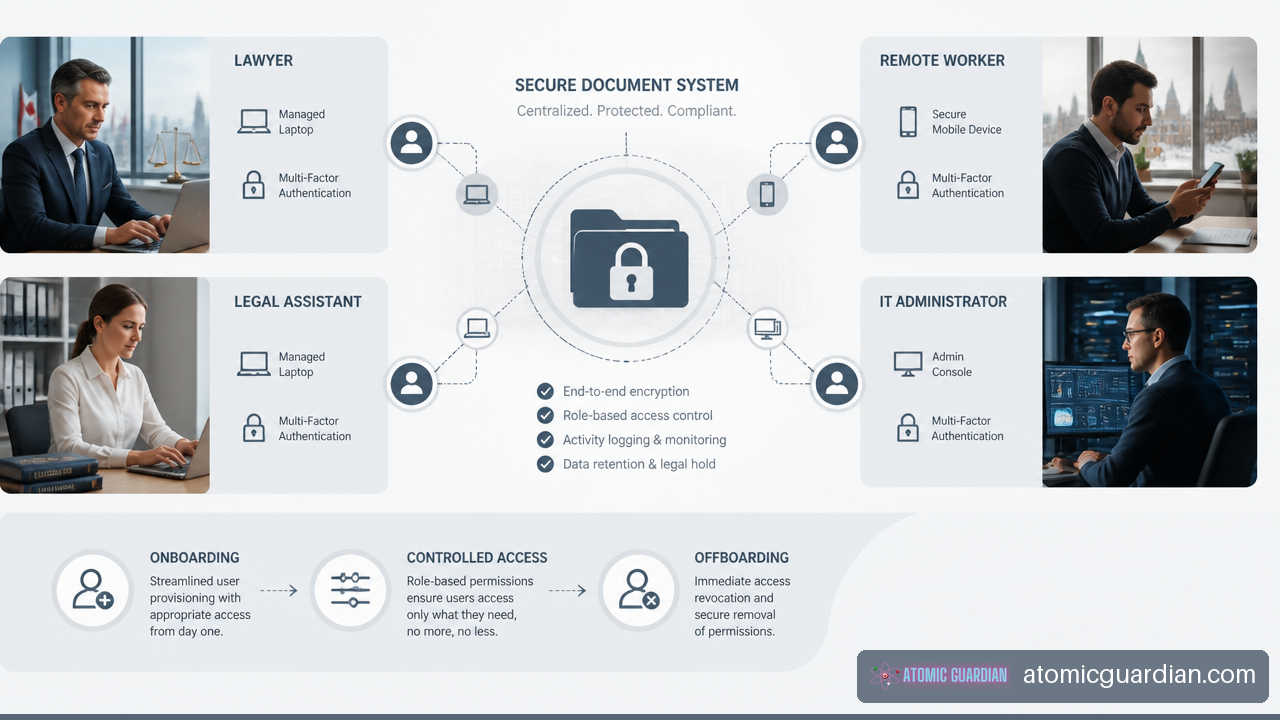
• Onboarding and offboarding are security events. The process should assign only necessary access on day one and remove access promptly when an employee, contractor, or student leaves.
• Recovery must be demonstrated, not assumed. Backups matter only if the firm can restore the right documents, systems, and user access within a timeframe that supports client service.
For a law firm, effective outsourced support is not measured only by closed tickets. It is measured by whether employees can work securely when timing, confidentiality, and client communication matter most.
How Employee Facing IT Support Should Work
Outsourced support works best when it is built around employee workflows rather than a generic device inventory. A legal assistant who cannot open a closing package, a lawyer locked out of Microsoft 365 before a hearing, and an office manager unable to print trust documents may all need urgent help. The technical cause may be different, but the business impact is immediate.
Support For Office Based Employees
Office employees often need help with workstations, printers, scanners, Wi Fi, meeting room equipment, file access, and legal applications. An outsourced helpdesk should give employees a simple path to report a problem by phone, portal, or email, while also identifying whether the issue affects one person or the whole firm.
For example, a single employee unable to access a document may have a permissions issue. If every employee cannot access a shared matter folder, the provider should treat it as a service disruption, investigate the document platform or identity system, and communicate updates to the appropriate firm contact.
A practical support workflow usually includes:
- Ticket intake and triage. The provider records the affected person, device, system, matter urgency, and symptoms.
- Remote diagnosis. Support staff verify identity, review system status, and use secure remote support tools where appropriate.
- Resolution or escalation. Straightforward issues are resolved quickly. Application, network, security, or vendor issues move to the right specialist.
- Employee communication. The user receives a clear status update, workaround, or expected next step.
- Root cause review. Recurring issues should lead to a permanent fix, such as device replacement, training, access redesign, or configuration changes.
The Canadian Bar Association describes examples of Ontario law firms outsourcing entire computer systems with 24/7 support, including remote support and on site escalation when remote resolution was not enough. Its cloud computing resource for legal practices is a useful reminder that outsourced support does not have to be remote only. On site escalation can still be necessary for failed network equipment, office connectivity, or hardware problems.
Support For Remote And Mobile Employees
Remote work expands the support boundary. Employees may use home internet, personal networks, firm issued laptops, mobile phones, or temporary workspaces. Your provider should define what it supports and what it cannot control.
A secure remote support model commonly includes multi factor authentication, encrypted devices, managed endpoint protection, approved cloud storage, secure remote access, and a process for lost or stolen equipment. It should also distinguish between a firm managed device and an unmanaged personal device.
Consider a lawyer working from home who cannot access a matter file before a client call. The fastest fix may be simple, such as reconnecting Microsoft 365 or restoring a locked account. But if the problem involves an unknown device, a suspicious sign in, or a shared home computer, the provider should slow down and verify identity before restoring access. Fast support should not bypass security.
For firms with internal IT capability, co-managed IT for law firms can divide responsibilities clearly. Your internal team may own legal application decisions and employee relationships, while the external provider handles monitoring, security operations, infrastructure, and overflow helpdesk coverage.
Legal Software Support Is Not Generic Desktop Support
A provider can be excellent at password resets and still be a poor fit for a law firm if it does not understand how legal applications connect to documents, email, billing, practice management, scanners, digital signatures, or eDiscovery workflows.
Before signing, ask which activities the provider will perform directly and which remain with the legal software vendor. For instance, the provider may maintain the workstation, network, user identity, browser configuration, and integrations, while the application vendor resolves a defect inside its own platform. The key is coordinated escalation. Employees should not be told to call three vendors and determine who owns the problem.
Your agreement should identify support for:
• Microsoft 365 email, calendar, Teams, SharePoint, and OneDrive permissions
• Document management and controlled file sharing
• Practice management, accounting, timekeeping, and billing tools
• Scanning, PDF workflows, secure client communications, and e signatures
• Litigation support, eDiscovery, or specialized real estate transaction tools where applicable
• Vendor coordination when a legal platform, payment tool, or line of business application fails
Protecting Confidentiality Privacy And Privilege
Security for a law firm is not one broad category. Outsourced IT support should address confidentiality, privacy, and privilege separately because each creates a different decision about access and handling.
Separate The Three Risk Categories
| Risk Category | What It Means In Practice | IT Support Control To Verify |
|---|---|---|
| Confidentiality | Client and matter information should not be disclosed to unauthorized people. | Role based access, secure remote support, access logging, and least privilege. |
| Privacy | Personal information must be handled appropriately throughout collection, use, storage, and disclosure. | Data inventory, retention rules, approved cloud services, and vendor access procedures. |
| Privilege | Certain lawyer client communications and legal work product require careful protection. | Restricted administrative access, documented support sessions, and controlled file handling. |
A support technician may need elevated access to solve a problem. That does not mean the technician should have standing access to every mailbox, matter folder, or document library. Ask how privileged access is requested, approved, time limited, recorded, and reviewed.
This matters most during urgent incidents. Suppose ransomware is suspected on a workstation containing active matter documents. The provider needs authority to isolate the device quickly. It should not need to search unrelated files or grant broad administrator access to staff who are not involved in the response.
Control Vendor Access And Support Tickets
Support tickets can contain more sensitive information than firms expect. Employees may paste client names, screenshots of matter files, account details, or email content into a ticket. A mature provider should reduce that exposure through ticket handling rules.
Ask direct questions:
• Where are support tickets stored, and who can access them?
• Can technicians view ticket attachments from outside Canada?
• Are support sessions logged and retained?
• How does the provider verify an employee before changing a password or granting access?
• Can the provider access mailboxes or files without approval from a designated firm contact?
• What is the process if a support employee needs elevated access during an incident?
Ontario firms should also use legal profession resources as a reference point, rather than relying only on a provider’s compliance language. The Law Society of Ontario maintains a Technology Resource Centre for Ontario lawyers and paralegals with technology practice supports and training. It provides a useful legal practice baseline when evaluating whether a proposed IT process fits the firm’s professional responsibilities.
Make Employee Lifecycle Controls Routine
Onboarding and offboarding should be repeatable workflows, not informal requests sent after someone starts or leaves. Delays create both productivity problems and unnecessary access risk.
For onboarding, the firm should supply the role, start date, office location, manager, applications needed, matter access requirements, device needs, and mobile access requirements. The provider then creates accounts, assigns licenses, configures the device, applies security controls, and confirms that the employee can use approved tools.
For offboarding, timing is more important. The firm should define who authorizes access removal, when access ends, how mobile devices are secured, who receives the employee’s mailbox or files, and how shared credentials are changed. Fair warning: disabling an account without a plan can interrupt client communications or leave a team unable to access active work. The process should preserve required business records while ending the departed person’s access.
The Law Society of Ontario also offers just in time technology guidance, coaching, and research support. That type of resource can help your firm connect technology decisions to real legal practice needs, especially when policies are being updated.
Choosing A Service Model And Setting Accountability
Your firm does not need to outsource every IT responsibility. The better model depends on your employee count, internal expertise, office complexity, risk tolerance, and willingness to manage vendors.
Fully Managed Or Co Managed Support
| Model | Best Fit | Main Benefit | Main Watchout |
|---|---|---|---|
| Fully managed IT | Small firms without dedicated IT staff or firms that want one accountable provider. | Centralized helpdesk, security, vendor coordination, and planning. | The contract must clearly define what is included and what requires extra work. |
| Co managed IT | Firms with an internal IT manager or administrator who needs specialist support. | Keeps internal knowledge while adding cybersecurity and operational capacity. | Responsibility gaps can appear if escalation ownership is unclear. |
| Limited project or break fix support | Firms with stable systems and internal capability for daily support. | Lower commitment for narrow needs. | Reactive work can leave security, documentation, and recovery testing incomplete. |
If one office manager is informally managing devices, passwords, vendor calls, and onboarding, fully managed support may reduce operational strain. If your firm already has an IT professional who understands the applications and users but lacks security operations capacity, co managed support may be more appropriate.
Use this guide on when to choose co-managed IT support to frame the decision around internal ownership, not just monthly cost.
Put The SLA Around Employee Impact
An SLA should describe service outcomes in plain language. A response time is not the same as a resolution time. A provider can acknowledge a ticket quickly but still leave an employee unable to work for hours.
Set severity levels based on legal operations. A firm wide email outage, a ransomware alert, or inability to access documents before a filing deadline should have a higher priority than a request for a new monitor. The SLA should state who has authority to declare an incident, who updates employees, when leadership is notified, and when outside vendors are engaged.
A useful SLA covers:
• Support hours and emergency contact methods
• Initial response targets by incident severity
• Escalation to senior technical staff and third party vendors
• Expected communication frequency during an outage
• On site support conditions and travel coverage
• Security incident response responsibilities
• Backup restoration priorities and recovery testing expectations
• Reporting on ticket volume, recurring issues, patching, access reviews, and unresolved risks
Vendor claims can help establish questions, but they are not independent proof. For example, a Canadian legal IT provider reports managed service pricing of roughly $185 to $245 per lawyer per month in some engagements and reports a 93% first contact resolution rate. Review those vendor reported law firm IT pricing and performance figures as examples of market positioning, not as a universal Ontario benchmark. Scope, number of devices, security requirements, offices, legal applications, and response commitments can materially change cost.
Test Recovery Before You Need It
A backup report showing green status is not proof of recovery. Your provider should test restoration of a file, a mailbox, an employee account, and a critical system or configuration. You should know who decides restoration priority if multiple systems are affected.
Imagine a real estate practice on a busy closing day. The firm may need access to current documents, email, phone systems, and document management before it needs every archived file restored. A recovery plan should rank systems by operational importance and set realistic recovery targets. If the provider cannot explain the sequence, the plan is incomplete.
For local firms evaluating broader support scope, managed IT services for small law firms in Toronto can provide additional context on how managed support may be structured around legal operations.
Ontario Implementation Checklist
A successful transition starts with a practical inventory and a clear decision owner. Do not begin by moving every system at once. Begin by identifying what employees use, what data is sensitive, and what work cannot stop.
Before Selecting A Provider
- List all employees, contractors, offices, remote workers, devices, mobile phones, and shared accounts.
- Identify critical systems, including email, document storage, practice management, accounting, legal research, scanning, and client communication tools.
- Classify high risk information, such as client personal information, financial records, matter files, privileged communications, and trust related documents.
- Document current support pain points, including repeat outages, slow response, unclear vendor ownership, failed backups, and unresolved access issues.
- Decide what remains internal. This may include approval of new users, matter access decisions, legal software ownership, and final policy decisions.
During Contract Review And Onboarding
- Confirm where data, backups, ticket records, and monitoring information are stored.
- Define support coverage, SLA targets, escalation contacts, reporting cadence, and any on site support requirements.
- Require a documented access model for provider technicians, including approval, logging, time limits, and access removal.
- Create onboarding and offboarding forms that connect HR, firm leadership, and IT support.
- Establish a security incident process that identifies who can isolate devices, notify leadership, contact insurers, and coordinate legal software vendors.
- Schedule recovery tests and access reviews instead of treating them as annual paperwork.
The Law Society of Ontario provides practical tutorials for commonly used legal technology, including tools used for home offices, email management, and video conferencing. These resources can complement your provider’s employee training and help you assess whether the guidance is practical for legal work.
After Go Live
Review the first 60 to 90 days closely. Look for repeated employee issues, unresolved application problems, requests that fall between vendors, and access changes that were delayed. This period often exposes the difference between a provider that simply closes tickets and one that improves the underlying service.
Ask leadership and employees whether they know how to get urgent help, report suspicious activity, request access, and escalate a deadline related issue. If the answer is unclear, the process needs adjustment.
Frequently Asked Questions
What Does Outsourced IT Support For Law Firm Employees In Ontario Usually Include?
It commonly includes helpdesk support, remote support, device management, Microsoft 365 administration, cybersecurity monitoring, backups, access management, network support, and coordination with legal software vendors. The exact scope varies, so you should separate included support from project work, after hours incidents, and third party software fees.
How Is Fully Managed IT Different From Co Managed IT?
Fully managed IT places most daily support and technology operations with the provider. Co managed IT splits responsibility between your internal staff and the provider. Choose co managed support when your firm has someone who can own internal systems and decisions but needs specialist capacity. Avoid it when responsibility boundaries are vague, because employees may be passed between teams.
How Can You Protect Client Confidentiality With An Outside IT Provider?
Use a contract and operating process that limits access, verifies identities, logs privileged administrative actions, protects remote support sessions, and defines how tickets and attachments are handled. Your firm should also approve who can request access changes and who can authorize emergency elevated access.
What Microsoft 365 Support Does A Law Firm Need?
Most firms need identity management, email security, mailbox support, Teams support, file sharing permissions, retention considerations, mobile device access, and secure collaboration settings. The priority is not enabling every feature. It is configuring the platform so employees can work without sharing files or credentials through unsafe workarounds.
How Should Employee Onboarding And Offboarding Be Handled?
Use standardized forms and a documented approval path. Onboarding should provide only the applications and files required for the role. Offboarding should remove access at the correct time, secure firm devices, preserve required records, transfer business communications where appropriate, and change shared credentials if they exist.
What Happens If There Is Downtime During A Filing Or Closing Deadline?
Your SLA and incident plan should define the escalation path before the event occurs. The provider should identify the severity, assign technical ownership, give the firm regular updates, and provide practical workarounds when available. Your internal leadership should decide client communication and business priorities, while the provider manages technical restoration and vendor escalation.
Are Ontario Law Firms Required To Use Local Data Storage Or Local Support?
Requirements can depend on the type of information, client expectations, contractual commitments, insurance conditions, and the firm’s own risk assessment. Do not assume that a provider’s Canadian presence answers every question. Ask where each service stores data, where support personnel are located, and whether any subcontractors can access data or support records.
Sources And References
• Law Society of Ontario, Welcome! Technology Resource Centre: https://lso.ca/lawyers/technology-resource-centre
• Law Society of Ontario, Practice resources and supports: https://lso.ca/lawyers/technology-resource-centre/practice-resources-and-supports
• Law Society of Ontario, Using technology: https://lso.ca/lawyers/technology-resource-centre/practice-resources-and-supports/using-technology
• Canadian Bar Association, Cloud computing: https://www.cba.org/resources/cba-practicelink/cloud-computing/
• Fusion Computing, IT Support for Canadian Law Firms [2026] – LSO-Aligned: https://fusioncomputing.ca/legal/